Client Health Monitor Agent for Earlier Risk Detection in a SaaS Environment
-
Industry
SaaS product development
-
Project type
AI agent integration
Softacom in Numbers
time to surface a risk signal after implementation
of routine monitoring work automated in the monitored workflow
missed early warning signals after implementation
Description
Softacom worked with a US-based SaaS company of approximately 200 employees that needed earlier visibility into account risk across support activity, SLA performance, product usage, and customer feedback.
The client relied on a largely manual monitoring process. Teams had to collect information from multiple systems, compare signals, and decide whether an account required escalation or proactive follow-up. As the customer base grew, this process became slow and inconsistent, which made early warning signs easier to miss.
The goal was to build a controlled Client Health Monitor Agent that could assemble cross-system account context, detect risk patterns earlier, and support faster operational response without removing human oversight.
- Fragmented account signals. Relevant indicators were spread across support tools, usage data, billing information, and customer feedback sources.
- Slow manual review. In some cases, building a reliable picture of client health took several hours or up to one to two days.
- Legacy-system constraints. Part of the business logic and historical data sat inside a Delphi 7-based core system that was not designed for modern analytics or AI-driven workflows.
- Limited visibility into patterns. Individual tickets or events did not always look critical on their own, but combined changes in activity, support load, and feedback often signaled growing account risk.
Solutions
Softacom started with a technical assessment of the client environment to determine how account-health data could be accessed, normalized, and used safely inside a controlled workflow. Because the Delphi 7-based core application was only partially synchronized with other services, a direct connection path was not always available.
To address this, the team designed and implemented an integration layer that enabled secure extraction and synchronization of the required data for the agent workflow. This step was important because the project was not just about adding an AI layer. It required making legacy and modern systems work together in a reliable way.
Softacom then developed the Client Health Monitor Agent to evaluate several categories of signals, including support ticket frequency, SLA-related events, changes in user activity, and feedback indicators. Instead of treating each event in isolation, the agent assembled account-level context and flagged combinations of signals that could indicate elevated risk.
During the pilot, the team identified an important pattern: some large clients opened many small support tickets that did not technically breach SLAs but still pointed to growing product friction. To make the workflow more useful, Softacom refined the logic so the agent evaluated behavior patterns across accounts rather than reviewing tickets one by one.
When the agent detected a meaningful pattern, it could create a follow-up task for the account owner, generate a short internal summary, and send a Slack notification to the team. Sensitive actions remained under human control.
Architecture Overview
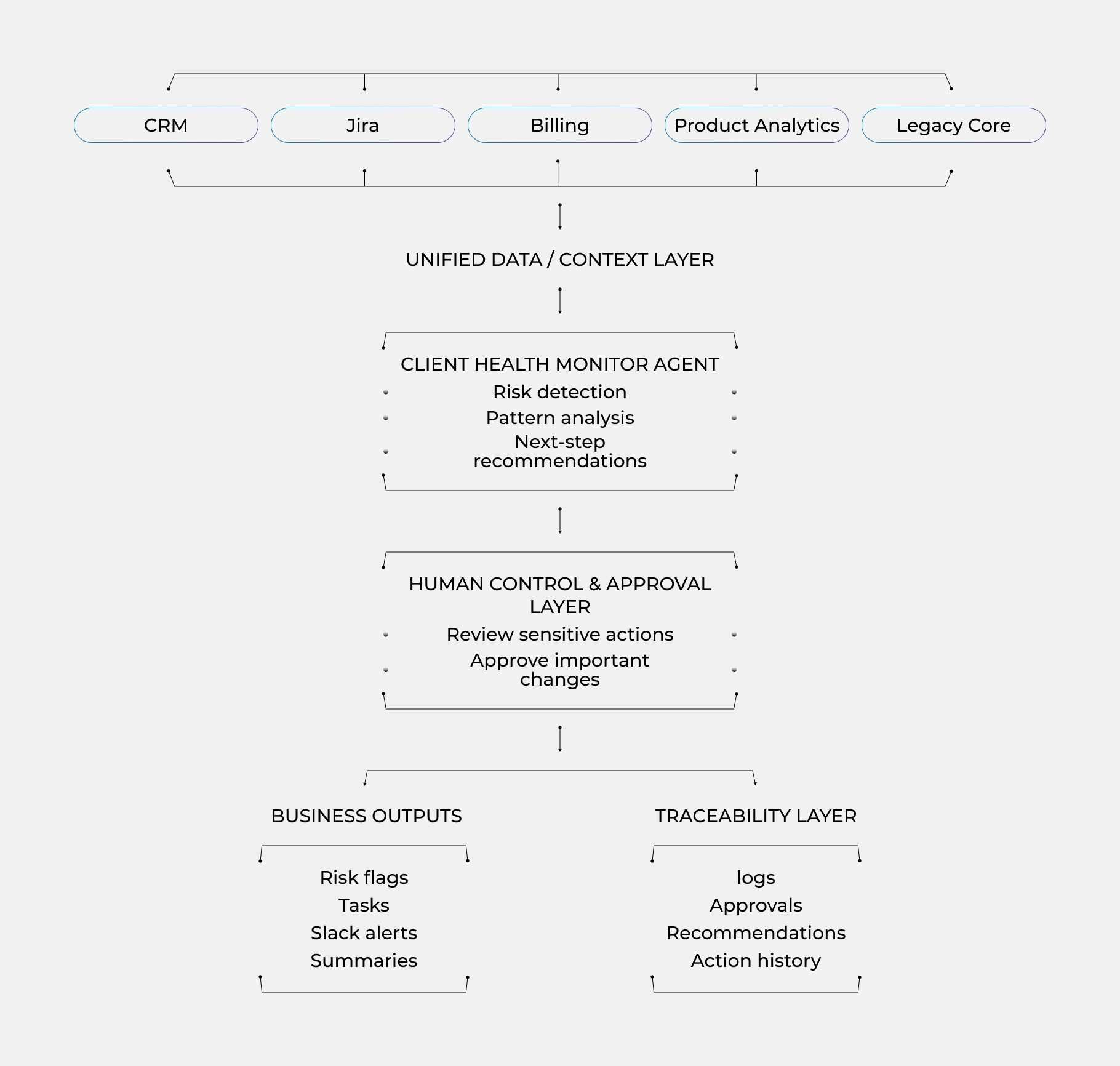
The architecture was designed as a controlled workflow rather than a fully autonomous system. The agent could surface risk, create internal follow-up actions, and support faster decision-making, while sensitive changes still required employee approval.
Outcomes
- Issue detection time decreased from one to two days to roughly 20–30 minutes after implementation, thanks to continuous monitoring across multiple signal sources.
- Routine monitoring activities were reduced by 43%, which lowered the amount of manual account review required from support and account teams.
- The client reported a substantial drop (from 24% to <3%) in missed early warning signals because the agent evaluated account-level patterns instead of isolated events.
- Support and account teams reduced time spent on repetitive monitoring work and were able to focus more on customer-facing decisions and follow-up.
- All recommendations and automated workflow steps were recorded in an operation log, which improved traceability and supported governance.
Key Takeaway
This case shows where custom AI agents are most useful: not as a generic chat layer, but as a controlled execution and monitoring layer for cross-system workflows. In this project, the real value came from combining legacy-system integration, account-level risk logic, and human-in-the-loop governance in one operational workflow.