- Overview
- Where and How to Start .NET Core 3.1 to 6 Migration?
- Development Environment Setup
- Tools for Migration
- Steps to Migrate from ASP.NET Core 3.1 to .NET 6.0
- Additional Considerations: Model Binding Changes and Breaking Changes
- Post-Migration Testing and Optimization: Model Binding, Entity Framework and DateTime Values
- .NET Core 3.1 to .NET 6 Migration Checklist
- Conclusion

Overview
Keep your frameworks modern. New versions help you maximize the efficiency of your app. This manual serves as a guide for developers seeking to upgrading .NET Core 3.1 to 6.
This migration enhances performance and introduces new functionalities. It also expands support for your applications. This guide will outline the prerequisites, tools and a detailed migration plan. Its aim is to help you ensure a transition from Dotnet 3.1 to 6.
Where and How to Start .NET Core 3.1 to 6 Migration?
In this guide, we will discuss the compatibility of the OS and development software. We will cover the installation of the .NET 6 packages and why you should back up your projects.
Before you touch the upgrade, prepare the environment. Make a full backup – migrations rarely fail, but when they do, rollback saves hours. A separate Git branch or even a ZIP copy is enough.
Next, assess risks. Check dependencies in Solution Explorer. Also, review SQL Server connections and identify outdated libraries. You should confirm support status for every component. Assess your environment early, too.
You can also scan your ASP.NET Core 3.1 dependencies for deprecated packages. You will understand which libraries may require replacement or updates. A lot of migration problems don’t come from the framework itself, but from old packages around it.
And since Microsoft stopped supporting .NET 6 in November 2024, those risks only grow over time. Validate whether your security policies require moving to newer versions later.
Don’t have internal resources to modernize .NET Core applications? Consider professional .NET migration services.
Development Environment Setup
To upgrade, set up your development environment for transitioning to .NET 6.
- Start with the operating system. .NET 6 depends on Windows 10 (1607 or newer), macOS 10.13+, or Linux. If the OS is behind, issues will show up early.
- Check the IDE. You’ll need Visual Studio 2019 or 2022, as these versions already provide the migration templates and debugging tools required for the job.
- Install the .NET 6 SDK. It includes everything needed to build and run applications: the runtime itself and the necessary command-line utilities.
The key point: all three need to be compatible and up to date. If they’re out of sync, the migration will break early and for reasons that have nothing to do with your code.
If the solution uses a global.json file, pin the required .NET SDK version there. This ensures every developer builds the project with the same SDK and avoids local inconsistencies.
Review your project file in Solution Explorer to confirm the current target framework moniker.
If needed, Softacom provides .NET migration services. We can help configure the development environment and migrate large enterprise .NET projects.
Tools for Migration
The right tools reduce manual work and lower migration risks. Here are those used when moving from .NET Core 3.1 to .NET 6.
- .NET Upgrade Assistant automates the upgrade of .NET projects to newer versions. It also performs many routine tasks automatically.
- Visual Studio. It is known for its robust development features. Visual Studio supports .NET 6 comprehensively. It offers tools for building and debugging .NET applications.
- Visual Studio Code. This is a lightweight option for developers working with ASP.NET Core or minimal APIs.
- NuGet Package Manager is what you use to handle external libraries. It makes it easier to update packages and ensure they work properly with .NET 6.
These utilities support a transition. They also contribute to the reliability of your applications as you upgrade to Dotnet 6.
Steps to Migrate from ASP.NET Core 3.1 to .NET 6.0
Migration from ASP.NET Core 3.1 to .NET 6 happens in stages. Skipping any of them usually leads to runtime issues after the upgrade.
This .NET 6 migration guide includes six core steps. They relate to the framework, project file, package references, minimal hosting model and docker images. Running build checks between steps ensures issues are caught early.
These steps ensure up to 99% compatibility after upgrading.
Update .NET SDK Version in global.json
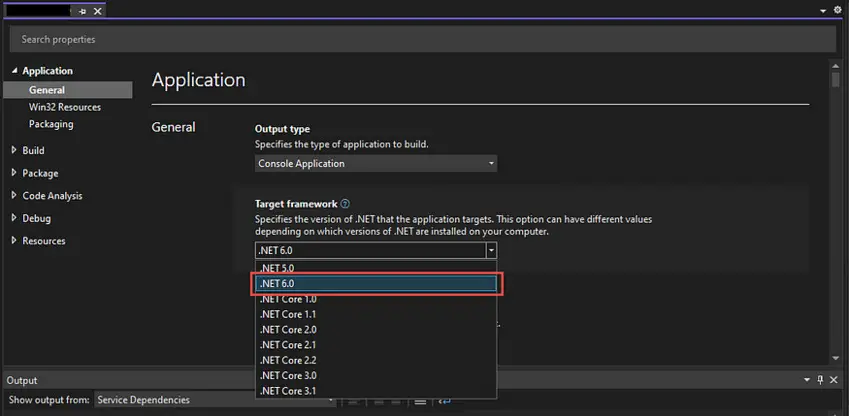
What to check?
If the project uses a global.json file, update the SDK version there. It must match the .NET 6 SDK installed on the machine.
How to do?
Update the global.json file in the project root to use 6.0.100 or the locally installed .NET 6 SDK version.
JSON
{ “sdk”: { “version”: “6.0.100” } }
Expected result
The project now builds and runs using the .NET 6 SDK. To confirm, run dotnet –version in the project directory and check the SDK version.
Update the Target Framework
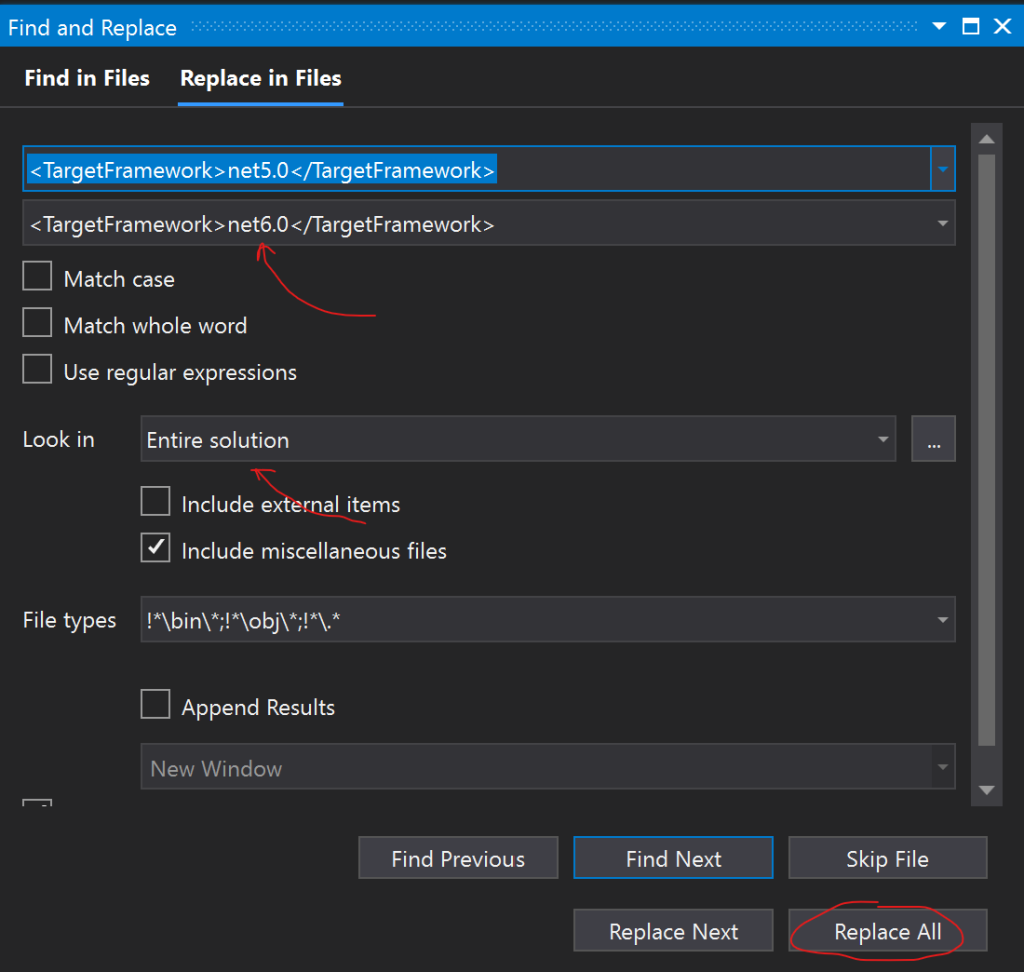
What to do?
Update the Target Framework Moniker (TFM) in your project file to .NET 6.0. This setting tells the build system to compile the application for .NET 6.
Teams can temporarily multi-target both netcoreapp3.1 and net6.0 to ease transition.
How to do?
Open your project file (.csproj). Update the element from netcoreapp3.1 to net 6.0.
xml
<Project Sdk=”Microsoft.NET.Sdk.Web”> <PropertyGroup><TargetFramework>net6.0</TargetFramework> </PropertyGroup> </Project>
Expected result
The project now targets .NET 6 upgrade. It can be confirmed by the absence of build errors related to incompatible versions.
Update Package References
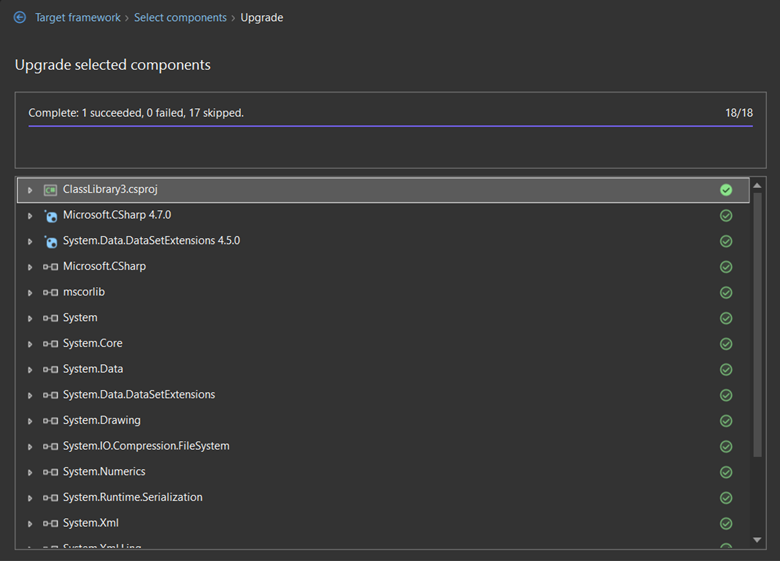
What to do?
Upgrade your NuGet package references to versions compatible with .NET 6. Newer versions should work with the minimal hosting model and new features.
Review references and ensure all dependencies support the target framework net6.0.
How to do?
Edit your project file. Update the versions of all Microsoft and third-party packages to their respective versions. They should support .NET 6. For instance:
xml
<ItemGroup> <PackageReference Include=”Microsoft.AspNetCore.JsonPatch” Version=”6.0.0″ /><PackageReference Include=”Microsoft.EntityFrameworkCore.Tools” Version=”6.0.0″ /><PackageReference Include=”Microsoft.Extensions.Caching.Abstractions” Version=”6.0.0″ /><PackageReference Include=”System.Net.Http.Json” Version=”6.0.0″ /> </ItemGroup>
Expected result
All project dependencies are now compatible with .NET 6. Verify by ensuring the project builds successfully without package compatibility issues.
Delete bin and obj folders
What to do?
Remove the bin and obj directories. It is necessary to clear old build outputs and ensure a clean build environment. This step is often added to local build scripts to ensure clean builds.
How to do?
Delete these folders manually or use the command line:
Bash
dotnet nuget locals all –clear
Expected result
Your upgrade project to .NET 6 should not retain any stale artefacts that conflict with the migration process.
Update Docker Images
What to do?
If your application is containerized, update your Dockerfile to use the .NET 6 runtime images. Newer versions of .NET use updated repositories and tags. So, ensure your configuration reflects this.
Include this step in CI/CD pipelines to avoid mismatches between environments.
How to do?
Below is how you can update your Docker pull command to reflect these changes:
– Docker pull mcr.microsoft.com/dotnet/core/aspnet:3.1
+ docker pull mcr.microsoft.com/dotnet/aspnet:6.0
What to expect?
Previously, Docker images were stored under the mcr.microsoft.com/dotnet/core repository. With .NET 5 and beyond, including .NET 6, images have been relocated to mcr.microsoft.com/dotnet
Additional Considerations: Model Binding Changes and Breaking Changes
As you go through the stages of .NET Core 3.1 to .NET 6 Migration, consider factors that may impact the app performance.
- Razor class libraries (RCLs). Update RCLs to target net6.0 and update other package references as necessary.
- Model binding changes. Address any changes in model binding behavior, especially for DateTime values. You will ensure they are bound as expected.
- Update deprecated APIs. Review the Microsoft documentation for deprecated APIs and their alternatives. If you are using JSON serialization, switch from Newtonsoft.Json to System.Text.Json
- Minimal hosting model replaces the older Startup.cs model.
- Minimal APIs offer a lightweight approach for small endpoints.
- Some breaking changes require moving from older JSON libraries to modern equivalents.
By following these steps, you will effectively upgrade .NET Core 3.1 to 6. You will leverage the latest improvements and features offered by the updated framework.
Post-Migration Testing and Optimization: Model Binding, Entity Framework and DateTime Values
After upgrading, verify that everything works as expected:
Key areas to test:
- Unit and integration tests. Ensure testing frameworks support .NET 6.
- Entity Framework Core. Validate database connections, migrations and SQL Server behavior.
- API behavior. Check routing, serialization, datetime values and model binding.
- Performance. .NET Core 3.1 vs .NET 6 often shows improved performance thanks to tiered compilation and new features.
- User workflows. Confirm that no breaking changes appear in business logic.
.NET Core 3.1 to .NET 6 Migration Checklist
This .NET migration checklist 2025 provides a step-by-step guide. Use it to ensure every aspect of the upgrade from .NET Core 3.1 to .NET 6 is addressed:
- Ensure that your global.json file (if present) specifies the .NET 6 SDK version.
- Modify the project file to change the element from netcoreapp3.1 to net6.0.
- NuGet package updates for .NET 6 compliance.
- Rebuild the project to ensure that there are no compilation errors.
- Delete bin and obj directories.
- Update Docker configuration and base docker images
- Razor class libraries (RCLs) update.
- Review model binding changes.
- Conduct testing.
Making sure you go through the checklist mentioned above. When you decide to migrate .NET Core 3.1 to .NET 6, it can help address any issues. This process verifies that your software is fine-tuned for improved performance and security.
Conclusion
.NET Core migration from 3.1 to 6 is a significant enhancement for any development project. It offers improved performance, extended support and new programming capabilities. For additional guidance and support during your migration process, consult these resources:
- Official .NET 6 Documentation
- .NET 6 Migration Guide by Microsoft
- Migration Guide from C# Corner From .NET Core 3.1 To .NET 6
By following this guide, developers can ensure a smooth transition of their applications.
If you need assistance with migration, contact Softacom for professional .NET migration services.